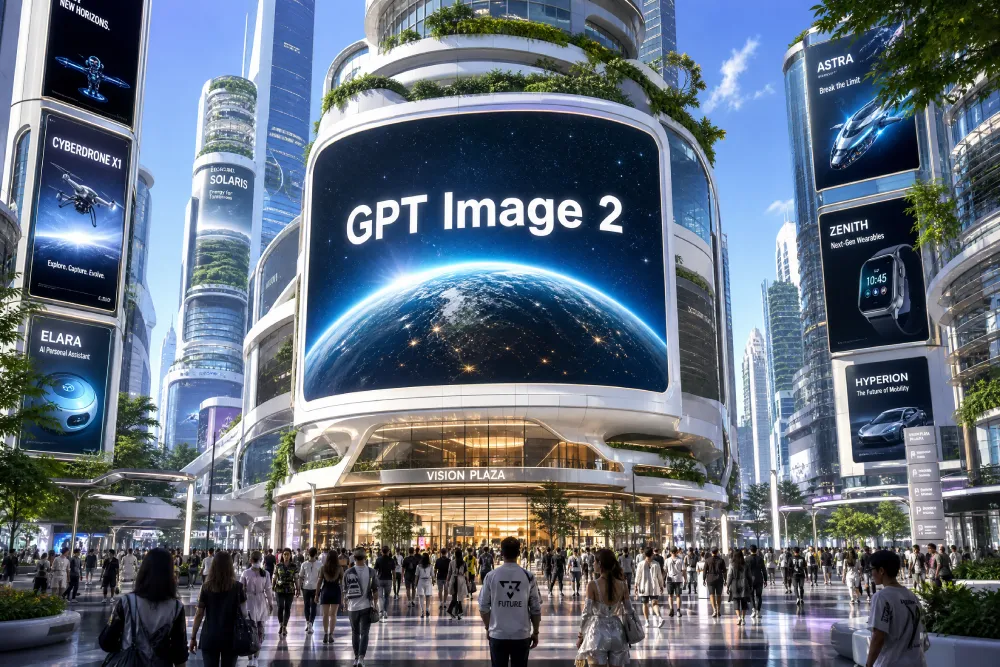
Generate professional-grade images instantly with GPT Image 2 AI Image Generator, powered by OpenAI’s advanced image model for sharp visuals, strong text rendering, native 4K output, and smarter prompt understanding.
GPT Image 2 AI Image Generator
0 / 5000
🪙Credits required:Free🏷️
Sample Image
(Your generated image will appear here)
What Is GPT Image 2 AI Image Generator?
01 / Instant Creation
Describe. Generate. Export.
GPT Image 2 AI image generator is an online tool for creating and editing images with simple text instructions. Instead of using complex design software, you can describe what you want to create, upload a reference image when needed, choose your output settings, and generate a visual directly in your browser.
02 / Built for Everyone
From Draft to Polish
The tool is built for users who want a faster way to create posters, product visuals, social media graphics, character concepts, text-based layouts, and creative image drafts. Whether you are starting from a blank prompt or editing an existing image, GPT Image 2 AI image generator gives you a simple workflow for turning ideas into usable visuals.
03 / Practical Utility
Faster Visual Workflows
You can use it for quick creative testing, marketing drafts, content production, design inspiration, and image variations. The goal is to make AI image creation easier, faster, and more practical for real projects.
Key Features of GPT Image 2 AI Image Generator
GPT Image 2 AI image generator combines prompt-based image creation with practical editing controls. You can enter a prompt to generate a new image, or upload an existing image and describe what you want to change.
Text-to-image generation from natural language prompts
Image upload and prompt-based editing
Flexible aspect ratio and resolution options
Original Ratio support for uploaded images
Strong text layout support for posters and graphics
Multilingual prompt support for global users
Browser-based workflow with no software download
Fast preview, refinement, and download process
With GPT Image 2 AI image generator, users can focus on the image idea instead of technical settings. You describe the subject, style, background, lighting, colors, and layout, then refine the result step by step.
How to Use GPT Image 2 AI Image Generator
Using GPT Image 2 AI image generator is simple, even if you have no design experience.
1
Enter a Prompt or Upload an Image
If you want to create a new image, enter a clear prompt describing the subject, style, scene, mood, colors, background, and any text you want in the image. If you want to edit an existing image, upload the image and describe the changes you want to make.
2
Choose Size, Ratio, and Resolution
Select the output format that fits your use case. Use square images for social posts, vertical formats for mobile content, wide formats for banners and posters, or Original Ratio when you want to keep the source image proportions.
3
Generate and Download
Click Generate Image to create or edit your image. Review the result, adjust the prompt if needed, and download the final version when it matches your idea.
This workflow makes GPT Image 2 AI image generator useful for both quick experiments and production-focused creative tasks.
Why Choose GPT Image 2 AI Image Generator?
A purpose-built solution that bridges the gap between text-based generation and canvas editing tools.
01
Dual Creation & Editing
GPT Image 2 AI image generator is designed for users who want a practical, browser-based way to create images without a complex design workflow. It is uniquely useful because it supports both creation and editing. You can start with a text prompt, upload an image for changes, adjust the output format, and refine the result in one place.
02
Extremely Beginner-Friendly
It is also highly beginner-friendly. You do not need Photoshop skills, illustration experience, or advanced prompt engineering knowledge. A clear description is enough to begin, and each new result gives you a better idea of how to improve the next prompt.
03
Empowering Teams & Creators
For creators, marketers, designers, founders, students, and small teams, GPT Image 2 AI image generator can reduce the time needed to explore visual ideas. It helps you move from concept to draft faster, especially for posters, product images, social graphics, thumbnails, and campaign visuals.
GPT Image 2 Use Cases
GPT Image 2 AI image generator can support a wide range of creative and business workflows.
Posters and Campaign Visuals
Create event posters, promotional graphics, campaign concepts, and educational visuals with clear layout direction, readable text areas, and strong visual hierarchy.
Product Visuals and Mockups
Generate product-style images, packaging concepts, website visuals, ad creatives, and commercial mockups before moving into final design or production.
Social Media Graphics
Use GPT Image 2 AI image generator to create posts, thumbnails, profile visuals, wallpapers, content headers, and creative assets for platforms like Instagram, TikTok, YouTube, and blogs.
Characters and AI Art
Explore character concepts, anime-style art, fantasy scenes, stylized portraits, concept art, and creative illustrations from detailed prompts.
Text-Based Image Layouts
Create visuals that include headlines, labels, layout ideas, poster text, or campaign copy. For better results, keep text instructions short, clear, and specific.
Ready-to-Use Prompts
Copy any prompt below directly into the generator above. Use it as a starting point, then change the subject, style, colors, layout, or text to match your own creative brief.
Music Festival
"Summer music festival poster, bold serif headline "SUMMER BEATS 2026" in white at top, lineup names in smaller sans-serif, dark teal background, art deco border"
Product Launch
"Minimalist product launch poster, headline "NEW ARRIVAL" in large clean sans-serif, tagline "Your skin. Simplified." below, sage green background, frosted glass bottle"
Book Cover
"Literary fiction book cover, dark forest green background, title "THE QUIET HOURS" in aged gold serif, author name at bottom in small caps, minimal editorial design"
Flash Sale
"Flash sale banner, "FLASH SALE — 40% OFF" centered in large white sans-serif, "LIMITED TIME" in red below, soft gradient peach to lavender background"
Coffee Mug
"Close-up product photo of matte ceramic coffee mug on weathered oak table, soft window light from the left, shallow depth of field, commercial e-commerce style"
Luxury Skincare
"Luxury skincare product, frosted glass bottle on white marble, dried rose petals, overhead 45° angle, diffused soft-box lighting, luxury editorial aesthetic"
Eco-Friendly Lifestyle
"Eco-friendly skincare lifestyle shot, frosted bottle in natural setting, flowing water and green leaves, soft sunlight, sustainability branding, pastel tones"
Wireless Earbuds
"Matte black wireless earbuds case on dark slate, studio lighting from above-left, subtle shadow, white background, commercial product photography, 8K"
Watercolor Anime
"Anime girl with short brown hair, blue school uniform, sunlit classroom, soft watercolor anime aesthetic, warm light, expressive eyes, clean linework"
Dark Fantasy
"Dark fantasy warrior at cliff edge overlooking ruined city, silver hair, black armor with glowing blue runes, dramatic overcast sky, cinematic mood"
90s Anime
"90s anime aesthetic, two teenage friends at summer festival, paper lanterns, warm amber evening light, grainy film texture, pastel palette, nostalgic mood"
Watercolor Landscape
"Watercolor landscape, mountain lake at golden sunset, soft washes of warm orange and deep blue, mirror reflection in still water, plein air impressionist style"
GPT Image 2 AI Image Generator is an online tool that helps you create and edit images with simple text prompts. You can generate new visuals from scratch or upload an image and describe the changes you want.
Yes. GPT Image 2 AI Image Generator is free to try, so you can test prompts, image styles, and editing workflows before using it for larger creative projects. Usage limits and export options may vary.
Yes. You can upload an existing image and use text instructions to change the background, colors, lighting, style, composition, or other visual details.
No. The tool is designed for beginners and non-designers. You can describe your idea in plain language, choose basic output settings, generate an image, and refine the result with simple prompt edits.
You can create posters, product visuals, social media graphics, anime-style art, characters, thumbnails, wallpapers, blog images, concept art, marketing visuals, and text-based layouts.
Start with the main subject, then add the style, background, lighting, color palette, mood, composition, and any text you want in the image. Clear, specific prompts usually produce stronger results.
Yes. You can choose common aspect ratios such as square, vertical, wide, or original ratio when working with an uploaded image. This helps you create images for social posts, banners, posters, and product visuals.
Review the image, then refine one detail at a time. You can adjust the prompt, change the style, improve the lighting, simplify the scene, modify the composition, or generate another version until the result matches your idea.
Try GPT Image 2 for Free
Prompt-based•Browser-ready
Create AI images with readable text, strong visual direction, and a simple workflow built for everyday creators.